How to write a client proposal with AI, without invented numbers
A language model can draft a convincing proposal in minutes. It can also put a wrong total on page three with the same confidence. This guide shows how to split the work so the words come from the model and every number comes from your rate and a calculation.
Why language models get numbers wrong
A language model writes by predicting the next piece of text. That works well for sentences. It works less well for arithmetic, because the model does not run a calculation: it produces digits that look like a plausible result. A short multiplication often comes out right. In a proposal with six lines and tax, one slip is enough to break the total, and nothing in the output tells you which number is wrong.
Prices are a different problem. When you ask a model "how much should I charge for this?", it has no access to your rate, your costs or your market. It answers with something that sounds typical, based on what it saw during training. That figure may come from another country, another year or another kind of work. It is not your price.
The third problem is the quietest. When information is missing, a model fills the gap. If your notes do not mention a day rate, a draft may still contain one. If the scope is vague, the model may decide it for you. And when the same total appears in the proposal and in the cover email, nothing guarantees that the two match.
None of this makes AI useless for proposals. It means the model should do the parts it is good at, and only those.
Separate the writing from the pricing
A proposal mixes three kinds of work, and each deserves different treatment.
- Writing. Restating the client's need in their words, describing the approach, listing deliverables, answering likely objections. A model does this well, and you edit the result.
- Estimating. How many days will each part take? A model can propose an estimate from the scope, but it is a judgment. It should come with its reasoning, so you can disagree with it.
- Pricing. Days multiplied by your rate, summed, plus tax. This is arithmetic on numbers you own. It belongs in a spreadsheet or in code, never in generated text.
The practical rule follows: the model never writes an amount. It writes the text and proposes days. Your rate and a calculation produce every figure, and the figures go into the document afterwards.
A day-rate estimate you can defend
You can apply this method with a spreadsheet and any chat tool. The steps are the same with or without Pandore.
- 01Split the work into packages
Cut the project into pieces the client can recognise: a discovery workshop, a design phase, a build, a handover. Avoid a package called "miscellaneous": it is where estimates go to hide.
- 02Estimate days for each package, with a basis
Next to each estimate, write why: "two half-day workshops plus one day of synthesis". A basis turns a guess into something the client, or you next week, can discuss.
- 03Round to a sensible unit
Days estimated to the hour suggest a precision nobody has. Rounding to the half day keeps the estimate honest and the pricing readable.
- 04Multiply by your day rate, then add tax
Rate times days for each line, a sum, then VAT if you charge it. Do this with a formula, not by hand and not in a prompt.
- 05Write down where each number comes from
Which rate, and from where. Which VAT rate, and from where. Which estimates were rounded. This short list is what you check before sending.
Say a consultant charges a hypothetical 600 euros per day before tax, and charges 20% VAT. The model proposes three packages:
| Package | Days estimated | Days priced | Total before tax |
|---|---|---|---|
| Discovery workshops | 2.5 | 2.5 | 1,500 |
| Process design | 3.8 | 4 | 2,400 |
| Rollout support | 3.5 | 3.5 | 2,100 |
| Total | 10 | 6,000 |
VAT at 20% adds 1,200, for 7,200 including tax. Notice the 3.8 days priced as 4: the change is small, but it should be visible, not silent.
How a Pandore Mission prepares a proposal
Missions in Pandore apply this split by design. A Mission takes a goal, proposes a plan, has the work done step by step, reviews it and keeps the deliverables. Missions run with Claude Code, using your own account. If you have never used one, this walkthrough covers the basics. Here is what is specific to a proposal.
It starts from the deal
Proposals live in the Professional space, next to clients and the deals pipeline. You can start a Mission from a client or prospect that has an open deal, or describe the goal in Missions and pick the deal when asked. The Mission then reads the deal, its notes, the logged exchanges and the client record. It reads nothing from your Personal space.
It asks for what is missing
Before showing you a plan, Pandore checks that it has what a proposal needs. If no deal is linked, it asks which one. For the rate, it looks first at an answer you gave in the Mission, then at the day rate on the client record, then at the default day rate in Settings. If there is none, it asks, and offers the rates already set on your client records as one-click choices. The question says why: Pandore never sets a price for you.
If the plan needs other details, it asks for those too, for at most two rounds. A question left unanswered becomes a starting assumption, written in the plan where you can see it.
You approve the plan
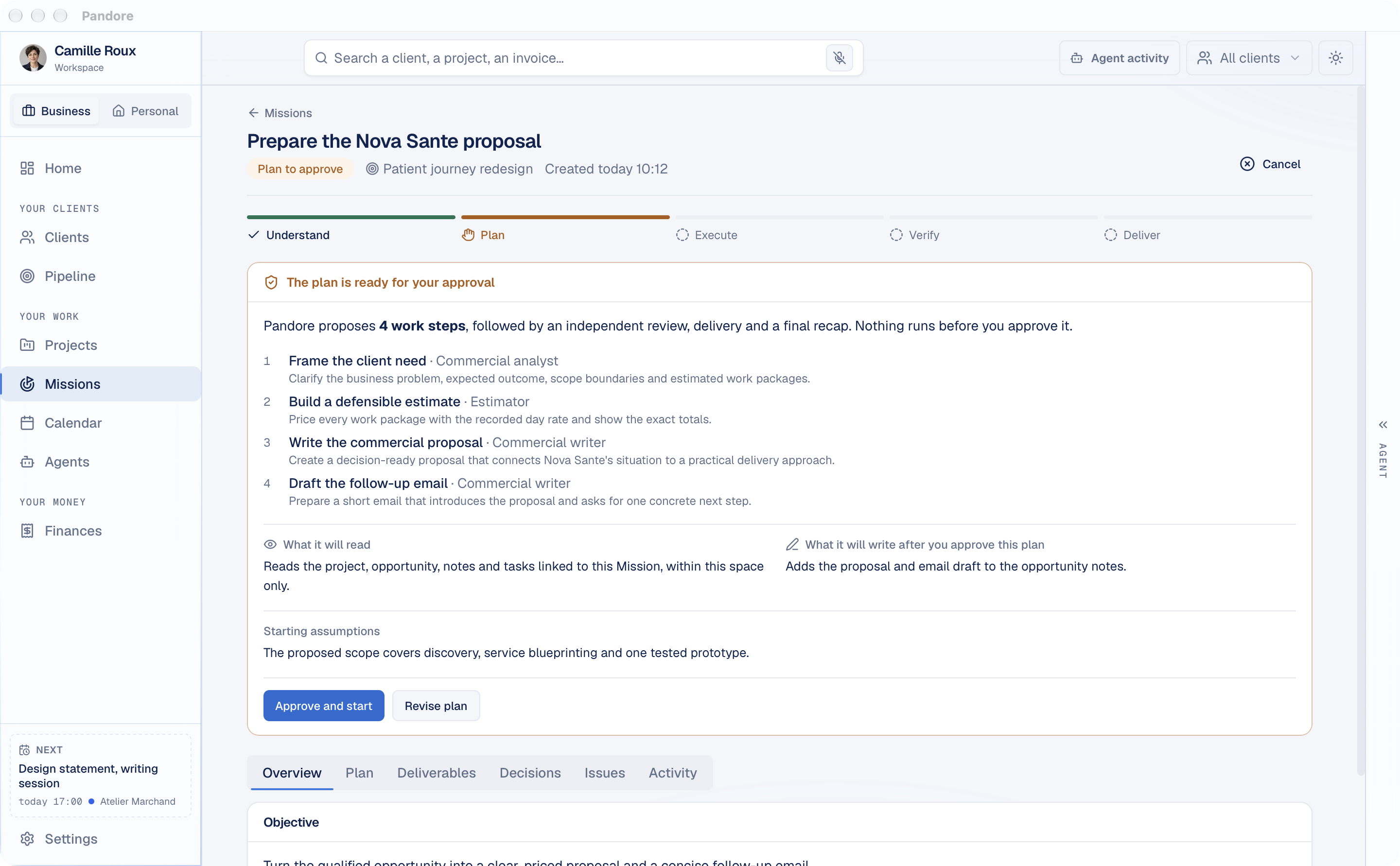
The plan lists the work steps and who does each one: a Commercial analyst for the needs analysis, an Estimator for the pricing, a Commercial writer for the proposal and the email. It also shows what the Mission will read, what it will write after your approval, and its starting assumptions. Click Approve and start, or Revise plan to say what should change. Nothing runs before that.
The agent analyses, the code prices
The needs analysis restates the need from the deal's notes and exchanges, sets what is in and out of scope, and splits the work into packages. Each package gets an estimate in days and the basis for it, presented as an assumption. The analysis also names the risks, with a way to handle each, and the questions to ask the client before signing.
The pricing step is not an agent. It is code. It takes the estimated days, rounds each one to the nearest half day (never below half a day), multiplies by your rate, and computes the totals before tax, the VAT and the total including tax, in euros. The VAT rate comes from your tax profile, and the pricing marks it as to be confirmed. The pricing document ends with a section explaining where each number comes from, including every rounding.
Then the writer drafts the proposal for the decision maker: their situation, the approach in phases, the deliverables, the conditions, and answers to likely objections. The pricing table in the proposal is not written by the agent: Pandore inserts the computed one.
An amount written by an agent is a defect
Every agent in the chain is told not to write a price, a rate or a total. Pandore then checks what comes back. An amount with a currency in the analysis, the proposal or the email is flagged as a major issue, and the step is sent back to be redone. The pricing is recalculated from scratch, line by line, and any mismatch stops it. The proposal's phases are also compared with the priced days, and a large gap is flagged.
An independent review, then delivery
A separate review step then reads the whole result, along with the results of those code checks. If it finds serious problems, the Mission runs one correction round on its own. If problems remain, it asks you: correct with your instructions, or deliver as it is.
The deliverables stay in the Mission: the needs analysis, the pricing, the proposal and a short cover email draft, which the agent is asked to keep under 150 words. In the email, the agent writes a placeholder where the total goes, and Pandore fills in the computed figure. The total in the email is the same one as in the proposal.
When the Mission is linked to a deal, the plan can also add the proposal and the email draft to the deal's notes. Updating the deal itself, for example moving it to the proposal stage and setting its amount to the computed total before tax, is a sensitive action: Pandore asks you to approve that precise change when it gets there. The Mission never sends the email. Sending stays your decision.
What to check before you send
The method removes arithmetic errors. It does not remove judgment. Before the proposal leaves your computer, go through this list:
- The days. Do the estimates match how you actually work? The basis next to each package makes this quick. Change the days, not the total.
- The scope. Is what you will not do written down? Many disagreements start there.
- The rate and its source. Is it the rate you meant for this client, or a default?
- The VAT. Is the rate right for your situation and for this client?
- The roundings. Are you comfortable with each one?
- The conditions. Validity, billing terms, payment schedule. The writer is told not to invent legal clauses, so add your own.
- The names. Client, contact, company. A wrong name costs more than a wrong comma.
- The questions for the client. Some are worth asking before you send, not after.
If you prepare proposals for several clients, this guide to a freelance client workflow with AI agents shows where they fit in the rest of your client work.