A freelancer's workflow with AI agents: from first call to invoice
Most freelancers use AI one task at a time, a summary here, an email there. This guide follows a whole client cycle, from the first call to the paid invoice, and shows where an AI agent saves real time, where it should only propose, and where it should stay out.
Three levels of delegation
A client cycle has six steps: the prospect, the deal, the project, the delivery, the time and the invoice. AI agents can help at every step, but not in the same way. One rule sorts most cases:
- The agent does it: drafting, summarizing, reviewing, searching your own notes and files. Mistakes here are cheap, because you read the result before it goes anywhere.
- The agent proposes, you confirm: anything that becomes a record you will rely on later, such as a deal, a time entry, an invoice or a meeting.
- You do it: prices, decisions, and anything that leaves your computer, such as sending, signing, or declaring a deal won or lost.
The examples below use Pandore's Professional space, where clients, pipeline, projects and finances live next to the agents. The rule works with any set of tools.
| Step | What the agent can do | What stays with you |
|---|---|---|
| Prospect | Prepare the call, summarize notes, propose a deal | The budget and the odds |
| Deal | Draft the proposal and the follow-up email | The price, sending, the outcome |
| Project | Propose the client and project, write the brief | The scope |
| Delivery | Draft, analyze and review, as a team | What the client receives |
| Time | Turn one sentence into a time entry | The hours themselves |
| Invoice | Record an invoice, mark it paid | Issuing the invoice |
Step 1: The first call
Before a call, the useful work is gathering what you already know. Ask the agent what you have on this person: past notes, earlier exchanges, and, if you connected a mailbox, the threads in your inbox. Pandore's mailbox connectors let agents read and search your inbox. They send nothing.
After the call, paste your rough notes into the chat and ask for a summary, the open questions and the next steps. This is where agents are at their best: turning ten messy lines into something you can still understand in three months.
Then comes the record. In Pandore, when the conversation calls for it, the agent proposes a card instead of writing directly: a deal for a prospect who is not yet a client, with a title, an amount if one was mentioned, a probability and a stage, or a follow-up meeting in the calendar. Nothing is saved until you click. You check the date it understood, fix the amount, and confirm.
Keep for yourself: the budget and the probability. If the prospect never gave a number, the field should stay empty. A guessed amount looks exactly like a real one once it sits in a pipeline total.
Step 2: The deal and the proposal
A deal moves through stages: lead, qualified, proposal, negotiation, then won or lost. Pandore's pipeline shows the open total, the weighted total (each amount multiplied by its probability), your win rate and the average length of a sales cycle. The CRM also flags every relation with no contact for more than sixty days, often the most useful number on the screen.
The proposal is where delegation pays off most, and where it is most dangerous. Writing the document is a good job for an agent. Pricing it is not: a model asked for a total produces a plausible number, and plausible is not the same as correct.
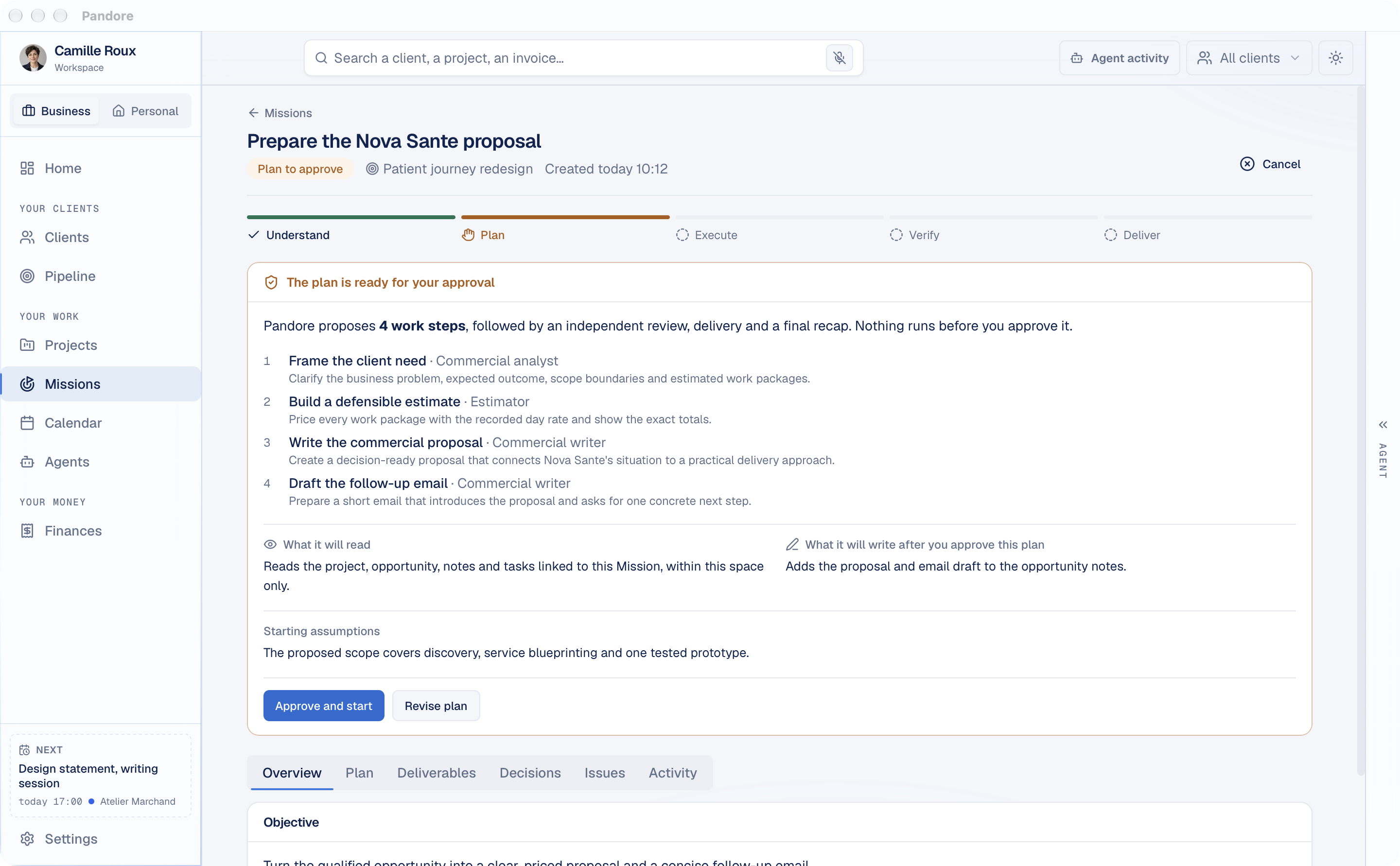
In Pandore, the proposal is a Mission. From the CRM page of a client or prospect with an open deal, one button starts it with the goal already written. The Mission asks for anything missing, such as your day rate, then shows its plan: the steps, what it will read, and what it will write once you approve.
The agent estimates the days for each work package. That is a judgement, and it is shown as one. Pandore's code then multiplies those days by your recorded day rate and adds VAT, so the totals add up. The proposal and a follow-up email draft go into the deal's notes. Nothing is sent. The Mission walkthrough covers each screen.
Keep for yourself: the day rate, the decision to send, and the outcome. An agent can propose moving a deal to another stage, but the card waits for your click. It cannot create a deal that is already won or lost, and marking a deal lost through the agent requires a reason. That reason is what you will learn from in six months.
Step 3: From signed deal to project
Once the deal is won, the prospect becomes a client and the work becomes a project. The agent can propose both. A client needs only a name to start, and a project needs an existing client. Contacts and billing details can come later.
The project is where you set the boundaries for every agent that will work on it:
- A working folder, where agents read, create and edit files.
- An optional reference folder for templates, contracts and client documents shared by several projects.
- Context for agents, what they should know from the start. Leave it empty and Pandore drafts it: an agent reads the working folder and writes a project brief.
Two more things save time later. First, the billing forecast: give the agent your day rate and the billable days planned, and it proposes a card that feeds Pandore's forecast without counting as invoiced or collected money. Second, the documents: save the signed proposal and the client's brief in the project folder, where agents working on the project can open them.
Keep for yourself: the scope. Agents follow whatever the brief says, so read the generated brief once and correct it.
Step 4: Delivery
This is where agents do the most work. In the project chat, type @ to call one or several agents: a Writer for a first draft, an Analyst for a data file, a Reviewer to check the result against the brief. Called together, they form a team: they answer in turn, each reads the previous answer, and each writes in its own bubble.
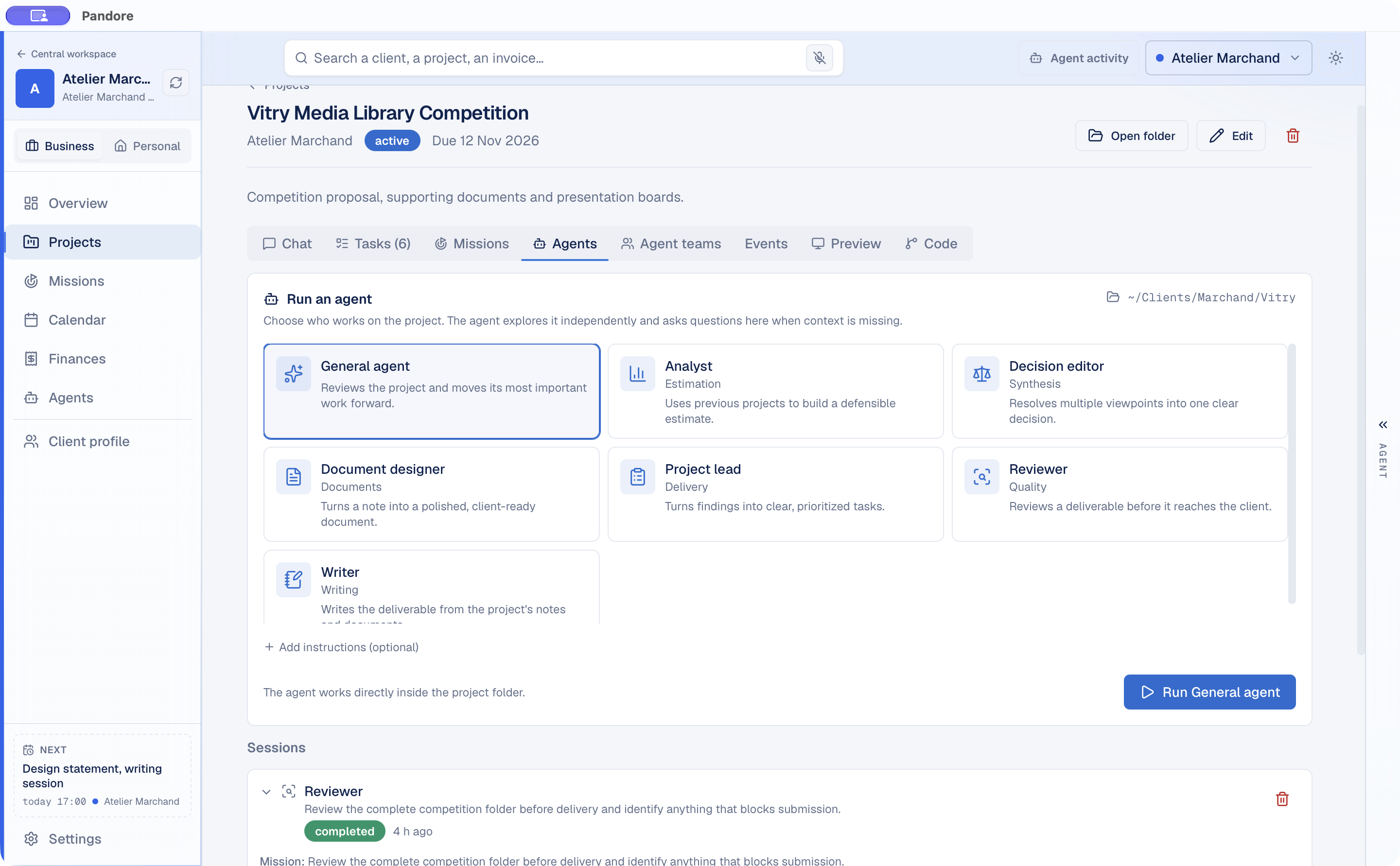
Agents run inside the project folder, with the permissions you chose in Settings: read only, allowed to change files, or allowed to run commands. A long session keeps running if you close the window, and the Agent activity panel shows what is running, waiting or finished, project by project.
Each project also has a memory. When an agent establishes a durable fact, such as a decision the client made or a constraint on the deliverable, Pandore keeps it in the project's Memory tab, with its source, and hands it to the next agent. You stop explaining, session after session, that the client wants British spelling.
Keep for yourself: the final read. A Reviewer agent is a useful second pair of eyes before delivery, not a replacement for yours. Whatever reaches the client should have been read by you.
Step 5: Time
Time tracking fails when it depends on remembering. The easiest moment to log time is right after the work, in one sentence. Type something like "three hours this morning on the workshop prep, billable" in the project chat, and the agent proposes a time entry with the project, the start, the duration and whether it is billable. One click saves it.
Later, ask how much time went into a project and how much of it was billable. The agent sees the totals per project.
If part of the work was done with remote agents, the AI usage dashboard shows tokens and reported cost per client and per project. That helps when you decide whether to bill that work or absorb it.
Keep for yourself: the hours. An agent can format a time entry. It cannot know how long you worked, so do not ask it to rebuild a month of timesheets from memory.
Step 6: Invoice and payment
Pandore does not issue invoices. You issue them in your invoicing tool, and Pandore records them so that your numbers live in one place. There are two ways:
- Drop the invoice PDF. Pandore reads it with plain code, not an AI model, recognizes the client and reads the amounts. A missing amount stays empty rather than guessed.
- Tell the agent. It proposes an invoice record with the number from your real invoice, the amount before tax, the VAT rate and a status, draft unless you say otherwise. If that number is already recorded, the card says so before you click.
When the money arrives, record the date it arrived, not the date you noticed it. That date drives the collections curve, so your real payment delays stay visible. Invoices still unpaid feed the twelve-month cash forecast, which answers one question: does your balance drop below your floor, and in which month? The finance screens also show who owes what, your expenses by category, and the effective day rate of each client. Invoicing and tax settings follow French rules for now, including VAT and social contribution deadlines.
Keep for yourself: the invoice itself. Numbers, legal mentions and amounts belong to your invoicing tool, and to you.
Keeping personal and professional apart
Pandore has two spaces, with a switch at the top of the sidebar. The Professional space holds clients, pipeline, time and finances. The Personal space holds your own projects, tasks, documents and Missions, with no clients, deals or invoices. The calendar and your agent roles are shared, so a dentist appointment and a client call appear in the same week.
The separation matters more with agents than without them. An agent works with the context it is given. If personal notes sit next to client files, sooner or later one ends up in the other's draft. In Pandore, a personal Mission cannot read professional data, and a professional Mission cannot read personal data. With any tool, the same habit helps: one folder and one conversation per client, and nothing personal in either.