AI token costs explained: input, output, cache, and how to spend less
An AI agent's bill is counted in tokens, and most people only look at the total. Once you know the four kinds of tokens and why agents consume so many of them, the total starts to make sense, and a few habits bring it down.
What a token is
A language model does not read words. It reads tokens: short pieces of text such as a whole common word, part of a longer word, a punctuation mark or a space. A common rule of thumb for English is about four characters per token, or roughly 100 tokens for 75 words.
Three details matter for cost:
- Other languages and code often need more tokens for the same meaning. French, German, numbers and code tend to split into more pieces than plain English.
- Each model family has its own tokenizer, so the same text gives a different count from one provider to another.
- Everything is tokens: your message, the instructions the tool adds, every file the model reads and every word it writes.
Providers price their models per token, usually per million tokens, with separate rates for what goes in and what comes out. Even when you do not pay per token directly, tokens are what the provider measures.
The four kinds of tokens on a bill
Usage reports from agents such as Claude Code split tokens into four kinds.
| Kind | What it is | How it is priced, in general |
|---|---|---|
| Input | Everything the model reads on a call that is not served from a cache: instructions, history, file contents, command output | The base rate |
| Output | Everything the model writes. On models that think before answering, that thinking is usually counted as output too | Higher than input, often several times |
| Cache write | Input the provider stores so the next call can reuse it | About the same as input, or a bit more, depending on the provider |
| Cache read | Input reused from that store | A fraction of the input rate |
The cache is not a memory of your project. It is a technical shortcut: the provider keeps the processed beginning of a prompt for a short time, usually minutes, and reuses it if the next call starts with exactly the same text. Change one word near the start and everything after it is read at full price again.
Why output costs more per token
Look at any provider's price list and output costs more per token than input, often several times more. The reason is mechanical. The model can process all the input tokens of a call in parallel, but it writes its answer one token at a time, and each new token needs a full pass through the model. Writing is slower work, so it is priced higher.
This has a practical consequence: asking for a short answer, a list of changes instead of a rewritten document, or "only the paragraph that changed" saves the most expensive kind of token.
Why input dominates agent costs anyway
Output is pricier per token, yet on an agent's bill input is usually the bigger number by far. The reason is the loop.
A chat answers once. An agent works in steps: read a file, think, run a command, read the result, edit, check. At every step the model reads the whole context again: its own instructions and tool descriptions, your request, the history, every file it opened and every result it received. The context grows, and it is re-read each time.
Here is the arithmetic on a made-up session. Say an agent starts with 20,000 tokens of instructions and files, adds about 2,000 tokens of new material per step, and works for 25 steps. The model reads 20,000 tokens at the first step, 22,000 at the second, and so on up to 68,000 at the last. In total that is 1.1 million input tokens. If it writes 500 tokens per step, output is 12,500 tokens: about one percent of the volume.
Most of those 1.1 million tokens are the same beginning, re-read again and again. That is exactly what the cache is for. When it works, the bulk of the session is billed as cache reads instead of full-price input.
Habits that reduce cost
None of these need special tools. They work with any agent.
- Start a new conversation for a new topic. History is re-read at every turn. A long conversation that wandered through five subjects makes each new question pay for all five.
- Point the agent at files instead of pasting them. An agent that can open a file reads what it needs. In Pandore, when you attach files in a project with a linked folder, they are copied into the folder and the agent receives their paths, not their content.
- Be precise about where to look. "Check the pricing section of proposal.md" costs far less than "read the project and tell me what is wrong".
- Keep durable facts in one stable place. Instead of re-explaining the client's constraints in every message, store them once. Pandore adds confirmed project memory items to the agent's context, pinned items first, within a fixed size limit. The guide on project memory for AI agents explains how to keep it short and useful.
- Work in bursts. Caches expire after a few minutes of inactivity. Ten questions in a row reuse the cache; ten questions spread over a day may each pay to rebuild it.
- Ask for less output. A diff, a list or a short answer instead of a full rewrite.
- Match the model to the task. Rewriting a paragraph does not need the largest model. In Settings › AI, each remote agent's model can be set to Auto: Pandore then picks a smaller, faster model for short simple requests and the most capable one for complex work.
- Send cheap tasks to a local model. A model running on your computer has no per-token cost. In Pandore's automatic mode, short everyday requests such as "rewrite this paragraph more clearly" stay local, and work that needs tools goes to the remote agent. The guide on local or cloud AI explains the rules and their limits.
Set budgets before you need them
A budget is most useful before the surprise. In Pandore's AI usage page, Budgets lets you set a token ceiling, a cost ceiling, or both, for the whole workspace, a client or a project, with a warning threshold such as 80%. Pandore compares both measures with usage over the period you are viewing and warns on whichever gets closer to its limit first.
Two details are worth knowing:
- Budget alerts inform, they do not block. An agent in the middle of a task is not stopped. Missions are the exception: each Mission has its own spending cap, and reaching it pauses the Mission.
- The suggested allocation follows real usage. If you set a global ceiling, Pandore can split it across projects: 80% according to each project's observed usage, 20% shared equally so quieter projects keep a small reserve. You can change every number before saving.
Reading the Pandore usage dashboard
Pandore records, for each run started from the app, the four kinds of tokens and the cost reported by the agent, along with the project, client, agent, model and type of work: agent sessions, Missions or chat. The AI usage dashboard turns that into a few readings.
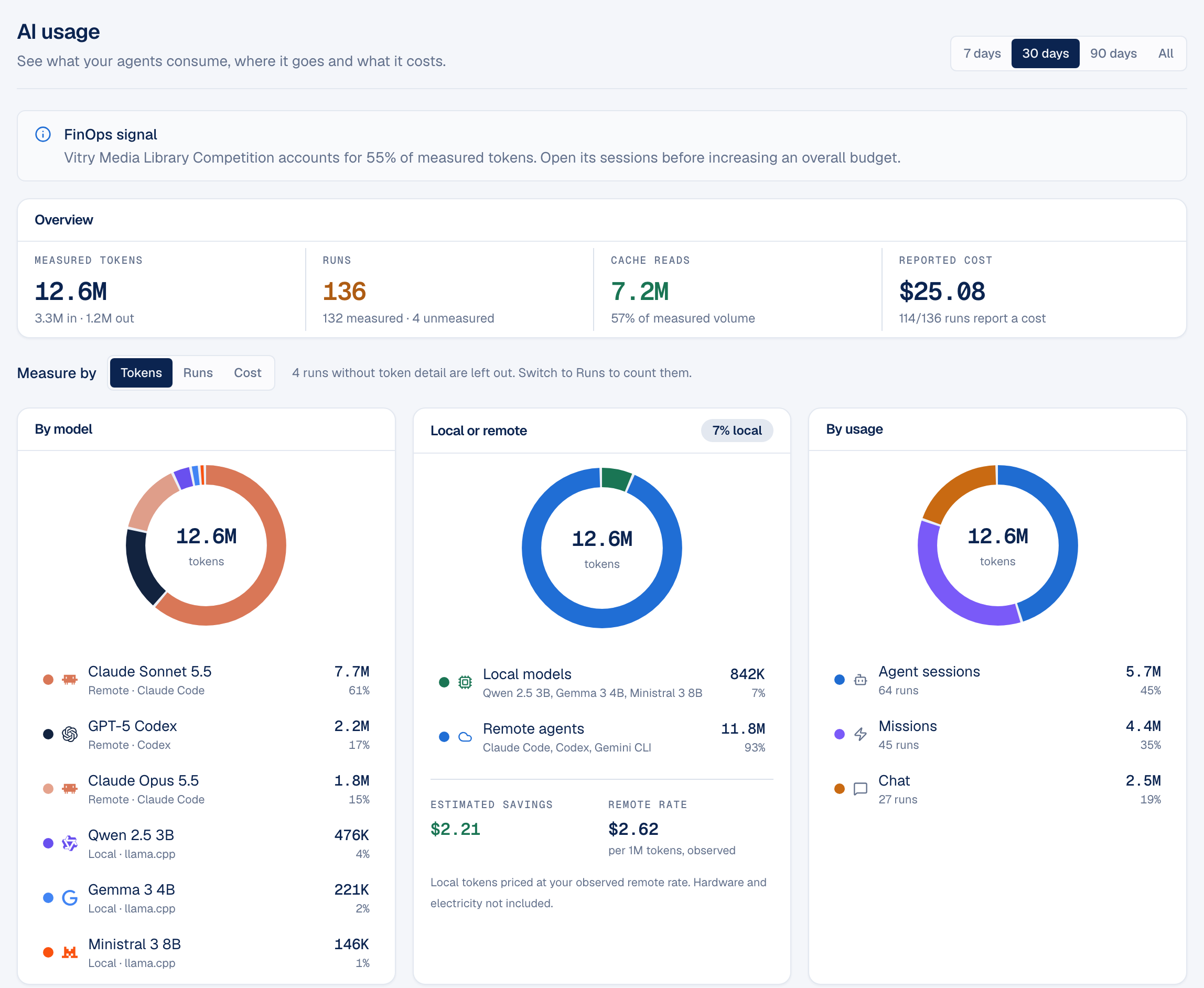
- Overview. Measured tokens with the split between input and output, runs measured and unmeasured, cache reads as a share of measured volume, and the reported cost with how many runs reported one.
- Measure by. Switch every chart between tokens, runs and cost. Tokens show volume; cost shows money. A model can lead one and not the other.
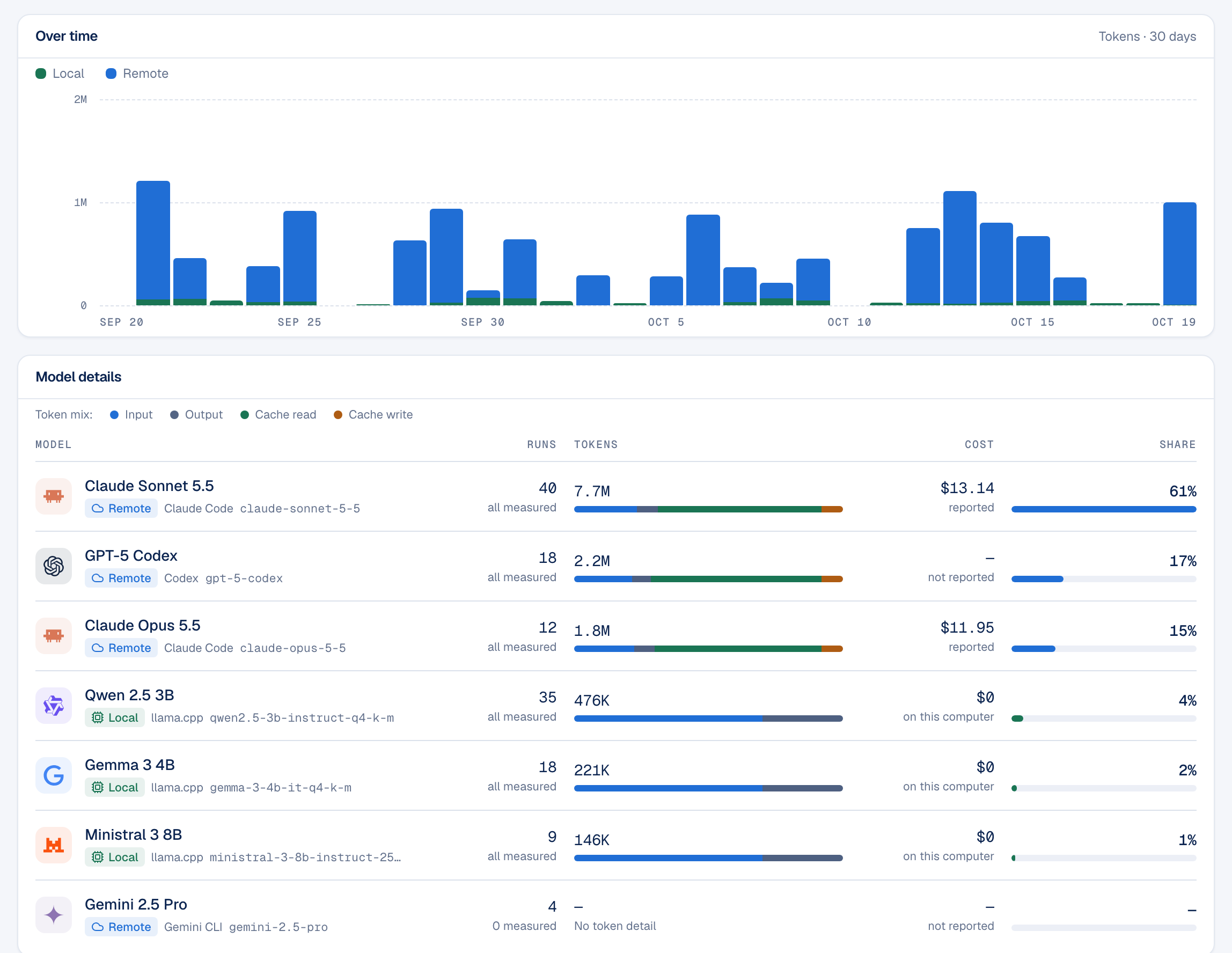
- Token mix. In Model details, each model has a bar split into input, output, cache read and cache write. A bar mostly made of cache reads means cheap re-reading. A bar mostly made of input means the agent receives a lot of fresh context on every call: the first place to look for savings.
- Local or remote. Local runs appear with their tokens and a cost of zero. Pandore estimates what they saved by pricing local tokens at the remote rate you actually observed in the period; hardware and electricity are not included, and without a remote run that reported a cost, no estimate is shown.
- Largest runs and rankings. The most expensive runs, and rankings by project, client and agent, show where to look first. The short signal at the top of the page also names a project when it concentrates a large share of tokens.
Coverage depends on what each agent reports. Claude Code reports tokens and cost, Codex reports tokens but no cost, and Gemini CLI runs are shown as unmeasured. For a hands-on setup, see the tutorial on tracking Claude Code usage and cost by project.