How to review a project folder with an AI agent before delivery
The last hour before a delivery is when mistakes slip through: an old figure in one document, a client name spelled two ways, an annex that never reached the folder. This guide shows how to have an AI agent read the whole folder first, without letting it change anything, and how to turn what it finds into tasks.
What an agent review is good for
You have read your deliverable ten times. That is the problem: by the tenth reading you see what you meant to write, not what is on the page. A second reader helps, and an AI agent working in the project folder is a second reader that opens every file, including the ones you stopped looking at.
It is good at mechanical, cross-document checks:
- a total in the report that does not match the total in the budget;
- a date or a client name that changes between two documents;
- a deliverable listed in the proposal that is missing from the folder;
- placeholder text, comments or a "draft" mention left in a final file.
It is weak at what is not written down: what the client said on a call, the tone this client expects, whether the strategy is the right one. Keep that part for yourself. The rest of this guide sets up a review that plays to the strengths and keeps the weak spots visible.
A pre-delivery checklist
Before you involve any agent, decide what "ready" means. This checklist works with or without AI. The last column says who should own each check.
| Check | What to look for | Best owner |
|---|---|---|
| Scope | Everything promised in the brief or proposal is delivered, and nothing extra is promised | Agent, then you |
| Figures | Totals, quantities and dates match across documents | Agent |
| Names | Client, contacts, project name and references are spelled the same everywhere | Agent |
| Leftovers | No placeholder text, internal comments, old versions or "draft" mentions | Agent |
| Annexes | Every annex mentioned in the text exists in the folder | Agent |
| Confidentiality | Nothing from another client, no internal notes or pricing logic | You, with the agent's help |
| Fit | Tone, priorities and anything agreed orally | You |
Put this list in your review brief. An agent asked to "check the folder" decides on its own what checking means. An agent given seven named checks reports on seven checks.
Prepare the folder
The agent can only compare documents it can find. Before the review:
- Put the deliverables and their sources in the project folder: the brief, the signed proposal or quote, the client's requirements, the files you are about to send.
- Save requirements that only exist in emails or screenshots into the folder too, as files the agent can open. A requirement that lives only in your inbox cannot be checked.
- Make the final version obvious, for example by moving older drafts into an
archivesubfolder. Otherwise the agent may review the wrong file and report problems you already fixed. - Prefer formats the agent can open without tools. PDFs and plain text are safe. For spreadsheets and word-processor files, add a PDF or CSV export for the review.
Pandore also gives each agent session the project context without you pasting it: client, project name, status, due date, description, and the context for agents written on the project. That is what lets a reviewer check the deliverable against the scope.
Run the review in read-only mode
A reviewer should report, not repair. If the agent quietly "fixes" a figure, you lose the trace of what was wrong, and it may have fixed it to the wrong value. Read-only also protects files you are about to send.
In Pandore, the setting is in Settings › AI, under the agent permissions for project folders:
- Read only: agents read the project's files without changing anything.
- Read and edit files: they create and edit files. Commands stay blocked.
- Read, edit and run: they also run commands such as builds, tests or git, which means they can delete files too.
Choose Read only before you start. Pandore translates it into each agent program's own options. Two things to know:
- It is a global setting. It applies to the agent sessions Pandore starts from the chat as well as from the Agents screen, so switch it back once the review is done.
- In read-only mode the agent cannot save its report as a file. The report stays in the session, which is usually what you want.
If the review should rely only on the folder, also turn off Web search on the same screen.
Brief the Reviewer agent
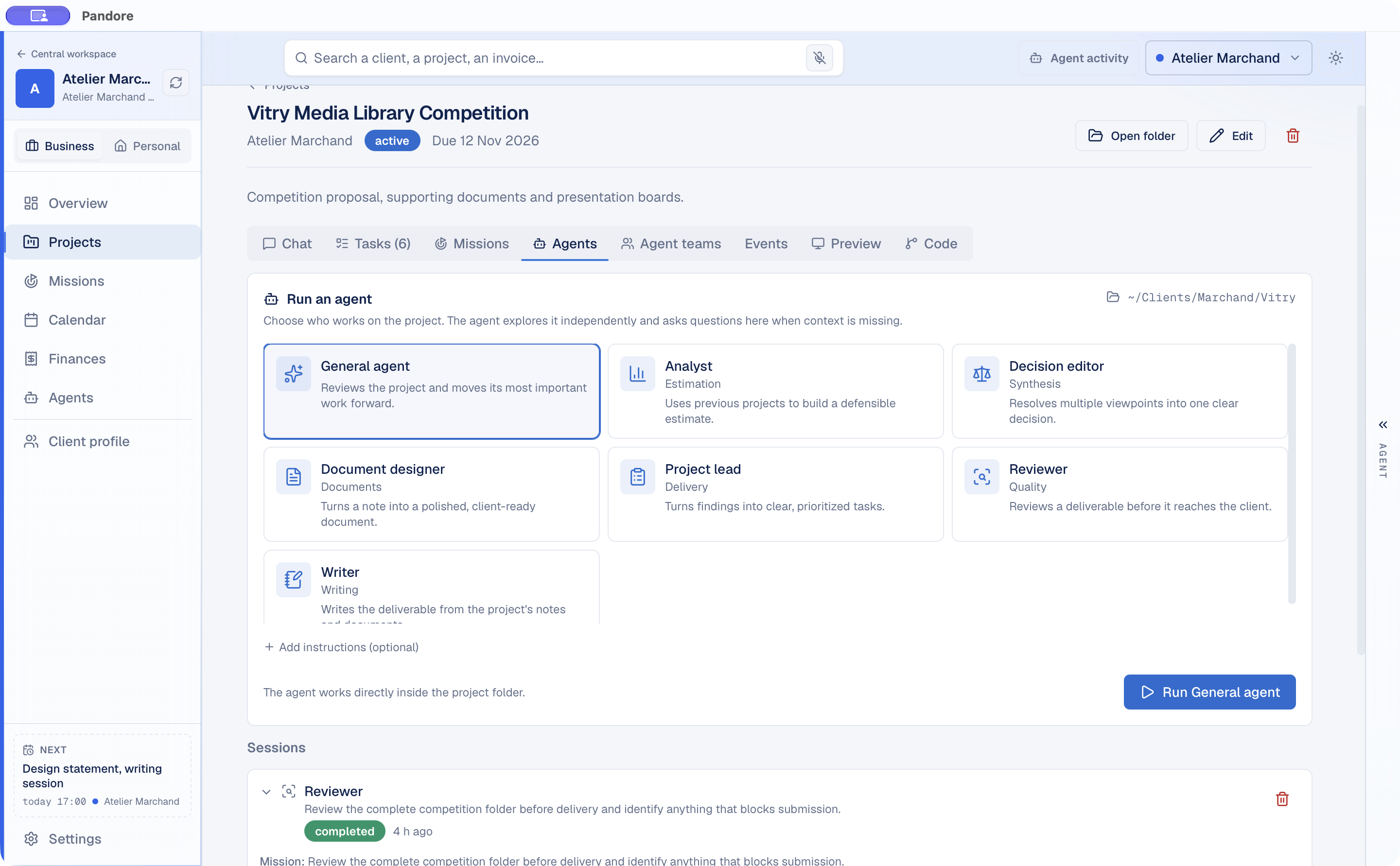
Pandore offers ready-made agent templates that you can edit, including a reviewer. Its instructions are a good model for any review brief, whatever tool you use. In substance, the agent:
- looks for problems in a fixed order: factual errors, promises the deliverable does not keep against the scope, ambiguous passages, then form;
- gives, for each problem, the exact location, what is wrong and the correction;
- ignores personal style preferences;
- says so in one line if the deliverable is good, and never invents a flaw to look useful.
The last rule matters more than it seems. Asked to review, models tend to find something, because finding nothing feels like failing the task. Saying that "nothing to report" is an acceptable answer removes that pressure.
To run it, open the project and go to the Agents tab. Select the Reviewer, click Add instructions (optional), paste your brief, then click Run. The agent works directly inside the project folder. You can also call it from the project chat by typing @ followed by its name.
A brief for a delivery review can look like this:
If the agent lacks information, it ends its answer with numbered questions and the session shows Waiting for your answer. Reply in the same session and it picks up where it stopped.
Ask for blockers and warnings separately
A flat list of twenty remarks is hard to act on the night before a delivery. Ask for severity levels, and define them in the brief:
- Blocker: the folder cannot go out as it is. A wrong figure, a missing deliverable, another client's name, a confidential note.
- Warning: it can go out, but it should be fixed soon or mentioned to the client. An ambiguous sentence, inconsistent formatting, an assumption that is not stated.
- Not reported: matters of taste. Tell the agent to skip them.
Then ask for a single table: severity, file and location, problem, quoted passage, suggested fix. The quote is your verification tool. You can check a blocker in seconds without trusting the agent's summary.
For software projects, Pandore's specialized code review role uses the same split: first what prevents shipping, with file and line, then what will pass but cost more later. Like the other specialized roles, it works only with Claude Code, and Pandore offers to install it the first time.
Turn findings into tasks
A review is useful only if the blockers get fixed. In Pandore, the shortest path goes through the project chat:
- Call the Reviewer with
@in the project chat. It answers in its own bubble. - In your next message, ask the chat: "Turn each blocker into a high-priority task due before Friday, and each warning into a normal task." The chat reads the agents' answers on the next message.
- The chat proposes each task as a card. Nothing is added until you click, and one answer proposes six items at most, so a long review takes a few rounds.
The tasks appear in the project's Tasks tab, as a list or as a board with To do, In progress and Done columns. On the board, overdue tasks come first in each column.
Once the blockers are fixed, run a second, narrower pass: "Check only that the blockers from the previous review are resolved." A narrow brief is quicker to read and uses fewer tokens.
Limits of an AI review
Be clear about what you are not getting:
- It reads, it does not know. Anything agreed orally or kept in your head is invisible to it.
- It makes mistakes in both directions. It can miss a real error and flag a correct passage. Check every blocker against the quoted passage before acting on it.
- It may not read everything. In a large folder, an agent can skip files. The list of files it read tells you what was actually covered.
- Arithmetic needs checking. A language model can misread or misadd figures. Recompute any total it questions, in the spreadsheet itself.
- It costs tokens. A full-folder review reads a lot. The AI usage dashboard shows what each run used, by project.
- The responsibility stays yours. An agent's "nothing to report" is a second opinion, not a sign-off.
If you deliver for clients every week, the guide on a freelance client workflow with AI agents shows where this review fits among the other steps.